Less Screening, More Hiring: The iRankr Way
Less Screening, More Hiring: The iRankr Way Hiring often starts with a flood of resumes and a simple question: who actually fits the role? Reviewing every application manually can slow the process, make comparisons difficult, and leave strong candidates buried in the pile. iRankr helps bring structure to that first stage. Add a job description, set the skills and responsibilities that matter, and bring candidate resumes into the opening. iRankr parses and compares the resumes, then [...]
Less Screening, More Hiring: The iRankr Way
Hiring often starts with a flood of resumes and a simple question: who actually fits the role? Reviewing every application manually can slow the process, make comparisons difficult, and leave strong candidates buried in the pile.
iRankr helps bring structure to that first stage. Add a job description, set the skills and responsibilities that matter, and bring candidate resumes into the opening. iRankr parses and compares the resumes, then gives your team scores, industry match, strengths, and gaps to guide screening. You can filter and shortlist candidates, contact them, and search your saved resume pool for potential matches
This guide explains how to use iRankr throughout the hiring workflow—from setting up an opening and sourcing candidates to screening, shortlisting, and preparing for interviews. iRankr supports the process; your team reviews the evidence and makes the final hiring decision.
The hiring process at a glance
- Define the role and hiring outcomes
- Create a job opening in iRankr.
- Add the job requirements, skills, and responsibilities.
- Set scoring weights and enable Industry Score if relevant.
- Publish the opening and source candidates.
- Add resumes to iRankr.
- Screen candidates using scores, fitment, industry match, and filters.
- Shortlist candidates and share profiles with the relevant members.
- Rediscover candidates in your existing pool
1. Define the role and hiring outcomes
Before creating an opening, decide what the person will be responsible for and what the organization needs them to achieve. The role may be focused on execution, specialist expertise, leadership, customer service, operations, or a combination.
Clarify:
- Role scope: What work will the person own?
- Required expertise: Which skills, tools, qualifications, or experience are essential?
- Business context: Which team, product, service, or customer need does the role support?
- Success measures: What should the person deliver in the first six to twelve months?
- Collaboration: Which teams, managers, customers, or partners will they work with?
- Level: Is this an entry-level, mid-level, senior, or leadership position?
- Work arrangement: Is the role full-time, part-time, contract, or another arrangement?
Write requirements in concrete terms. A broad phrase such as “strong communication skills” is difficult to assess by itself. A more useful description explains what the person will communicate, with whom, and in what situation
2. Create the job opening in iRankr
Create a new job opening and complete the Job Opening Details. iRankr’s help documentation lists fields such as Account, Company Description, Designation, and Department. You can upload an existing job description as a PDF or DOCX for iRankr to extract relevant details, or enter the information manually. iRankr Help Docs
Example:
- Designation: Use the job title candidates will recognize
- Department: Use the job title candidates will recognize
- Company Description: Summarize the organization, its work, and relevant context.
Use a title and description that accurately represent the position. A clear opening helps applicants understand the opportunity and gives iRankr more relevant information for resume matching.
3. Add role-specific requirements
Enter the education, required experience, skills, and responsibilities that describe the opening. Make a distinction between requirements the candidate must have on day one and skills they can learn after joining.
The Responsibility field is particularly important: iRankr uses this information to assess how closely a candidate’s experience aligns with the role. It is also mentioned in FAQ that the Skills and Responsibility fields must be completed for Resume Scoring to work. iRankr Help Docs iRankr FAQs
4. Set scoring weights and review job settings
In the job’s Settings tab, configure weights for Education, Experience, Skills, and Responsibility. iRankr has already set an example defaults of 10%, 20%, 30%, and 40%, which if required can be changed according to the requirement, The four weights must total exactly 100% before the opening can be saved. . iRankr Help Docs
For example :
| Criterion | Example weight |
| Education | 10% |
| Experience | 20% |
| Skills | 30% |
| Responsibility | 40% |
| Total | 100% |
This is an example, not a universal recommendation. Give more weight to the criteria that matter most for the position. For some roles, relevant experience or specialist skills may be more important than formal education.
Also review:
- Job ID: iRankr generates a unique ID for the opening. It can help route resumes received through email to the right job.
- Process Resumes from Email: Turn this on if you want iRankr to retrieve resumes from a connected inbox.
- Industry Score: Enable this when the candidate’s industry background is relevant to the position.
Save the opening after required fields are complete and the weights total 100%.
5. Publish the opening on linkedin
From the job’s Edit Job Opening page, use Post on LinkedIn to generate an editable draft based on the role details saved in iRankr. The draft may include the title, company, department, experience, education, skills, and responsibilities. Review it for accuracy before sharing. iRankr Help Docs
6. Add resumes to iRankr
iRankr documents several ways to add candidates to an opening.
Upload PDF or DOCX resumes
Select Upload Resume, choose one or more files, review the selection, and submit them. iRankr parses candidate details and scores resumes against the job. The help documentation lists a maximum file size of 10 MB per PDF or DOCX resume.
Upload a spreadsheet
For a larger candidate batch, select Upload Excel, download iRankr’s template, fill it in, and preserve the template’s column names. Upload the completed XLSX or CSV file.
The help documentation lists a maximum file size of 20 MB and up to 1,000 candidate rows. iRankr Help Docs
Fetch resumes from email
The Fetch resumes from email option lets iRankr retrieve resumes from a connected Gmail or Microsoft 365/Outlook inbox and add them to the relevant job’s candidate pipeline. It matches emails to the opening using the Job ID or job title in the subject, then processes the attached resumes against that role’s requirements
Rediscover resumes (candidates) in your existing candidate pool
Use Candidate Re-discovery to find potential matches among resumes previously saved in iRankr. Open the job’s Candidate Re-discovery tab, enter how many candidates you want to review, and select Fetch Top Candidates. iRankr searches the saved resume pool and scores candidates against the current opening.
Fresh Applications are candidates who applied to this job. Re-discovery searches resumes saved from other jobs or in the Candidate Pool. Candidates already shortlisted or ignored are skipped in later fetches,. Re-discovery scoring uses credits, so select a candidate count that fits your search. iRankr FAQs
7. Screen candidates in iRankr
Once resumes have been processed, open the job’s candidate list or Fresh Applications view. iRankr parses candidate resumes and compares them with the requirements in the job opening.
Review these candidate insights:
- Resume Score or Fitment Score: Indicates how closely a resume matches the job description.
- Strengths and gaps: Summarizes relevant experience and skills, and highlights requirements that may be missing.
- Industry Score or Industry Match: Adds information about the relevance of a candidate’s industry experience to your company’s sector.
How to use Industry Score
iRankr describes its Industry Score as an additional evaluation layer that considers how a candidate’s functional background and past companies align with the company’s industry. Its product page describes Industry Match as a way to assess domain relevance, not just job-title similarity. The score is most useful when prior industry experience
Use Industry Score as one screening signal, not a rigid pass/fail rule. . A candidate from an adjacent industry may still have the functional skills and experience the role requires. Compare Industry Score with the Resume Score, Fitment & Gaps, and the evidence in the candidate’s resume.
Use filters to refine the screening list
iRankr’s Explore view lets reviewers search, filter, and sort candidates. It sort candidates by filtering by score, skills, experience, and location, and searching by candidate name or skill. Use the filters to narrow the pool based on the requirements you entered for the opening. iRankr FAQs
For each candidate you are considering, review:
- Evidence of the required skills.
- Relevant responsibilities and accomplishments.
- Experience with the tools, systems, or customers specified in the opening.
- The fitment summary and any gaps to verify.
- Whether the candidate’s industry background is relevant to the role.
Use gaps to prepare follow-up questions. For example, if a required skill is not clear from a resume, ask the candidate to describe a project where they used it.
Screening scores help prioritize review; they do not make the hiring decision. Read the resume and verify relevant experience before deciding whether to shortlist a candidate.
8. Shortlist candidates and involve the relevant manager
Move candidates who meet the essential requirements into Shortlisted. Use Ignore to remove candidates who clearly do not fit from your active view. These actions organize the candidate pipeline; ignored profiles are not necessarily deleted. iRankr FAQs
If the role needs input from another reviewer, You can forward the profile you want to share with the other member by clicking Send to TM option: select shortlisted candidates, enter the required manager’s email, and send the selected profiles with scores, strengths, and resumes. iRankr FAQs
For other kinds of roles, share the shortlist with the appropriate hiring manager or subject matter reviewer and ask them to assess the role-specific evidence.
9. Contact and interview shortlisted candidates
You can use the email action on a candidate card to contact shortlisted candidates. You can also edit the draft message that can be sent from the candidate profile. Use it to explain the role, confirm interest, and outline the next step. iRankr FAQs
For interviews, use a consistent set of job-related questions for each finalist. Ask candidates to describe relevant work, explain their contribution, and discuss how they approached challenges related to the position.
Where a practical assessment is useful, keep it short and relevant to the actual work. Tell candidates what you will evaluate and how much time the exercise should take.
10 Review and make the decision
Review the full evidence together:
- Resume and work history.
- iRankr scores, fitment, strengths, and gaps.
- Interview responses.
- Practical exercise or portfolio, if applicable.
iRankr’s outputs support recruitment decisions and do not replace human judgment; the hiring organization remains responsible for the final decision.
iRankr tools used in the process
| iRankr capability | How it supports hiring |
| Job opening creation | Stores the role, company context, skills, experience, and responsibilities |
| JD upload or manual entry | Lets you import a PDF/DOCX job description or enter requirements directly |
| Configurable scoring weights | Sets the relative importance of education, experience, skills, and responsibilities |
| Resume parsing and scoring | Extracts candidate information and compares resumes with the opening |
| Industry Score / Industry Match | Helps assess relevance of prior industry and functional experience |
| Fitment, strengths, and gaps | Helps reviewers see matching evidence and areas to verify |
| Resume upload | Adds individual or multiple PDF/DOCX resumes |
| XLSX/CSV upload | Adds candidates in bulk using iRankr’s template |
| Email resume fetching | Retrieves resumes from a connected Gmail or Microsoft 365/Outlook inbox |
| Explore and filters | Searches, sorts, and narrows candidates by available criteria |
| Shortlist and Ignore | Organizes candidates for review |
| Candidate email action | Helps contact candidates from their profile card |
| Send to TM | Shares selected candidates and resumes with a technical manager |
| Candidate Pool and Re-discovery | Finds relevant candidates from resumes already saved in iRankr |
Feature details and limits may change; use the current in-product instructions for your account.
Complete iRankr workflow for hiring
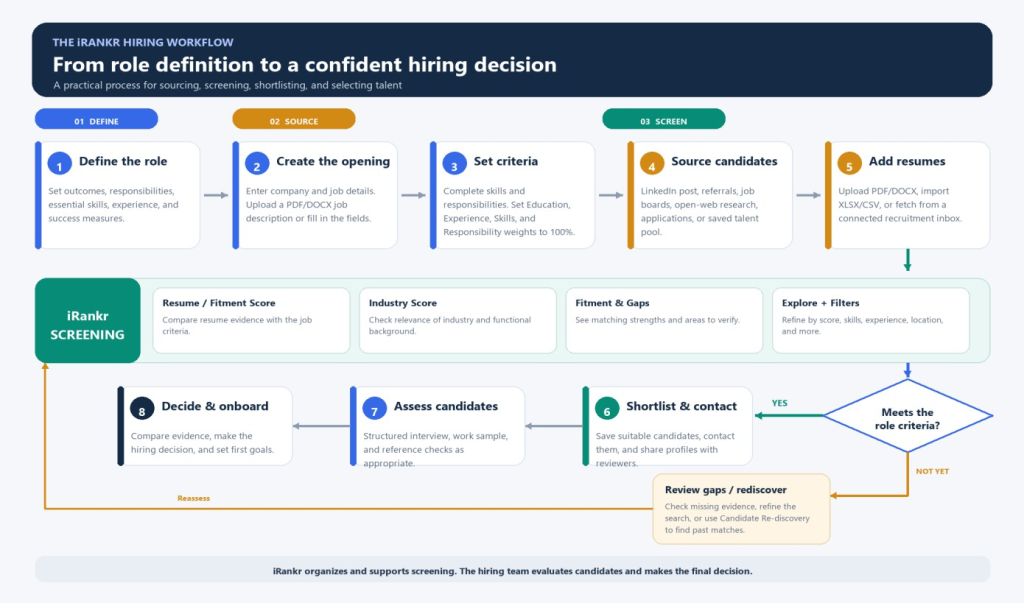
iRankr helps organize the job opening, resume intake, screening insights, and candidate pipeline. Your hiring team reviews the evidence, interviews candidates, and selects the person who best fits the role.
You Might Be Interested In

How to Write a Job Description That Makes Candidate Screening Easier
Imagine two recruiters screening the same role. One prioritises technical skills; the other focuses on years of experience. Both may be doing their best—but if the job description is vague, they can end up with very different shortlists. A clear job description gives candidates a better picture of the role and gives recruiters a shared [...]

Candidate Rediscovery
The Problem With Starting From Zero Every time a new role opens, most recruiting teams do the same thing. They write a job description, post it on job boards, and start sourcing candidates as if this is the first time anyone has ever applied to their company. But it usually isn't. Somewhere in the ATS, [...]

How We Hired a Full Stack Developer in 3 Days with iRankr
We needed to hire a Full Stack Developer, and we needed to move fast. Three days later we had an offer out: 152 applications screened, 6 candidates interviewed, one strong hire, and ₹0 spent on job boards. If you're a recruiter or founder juggling urgent roles against a hiring budget that never stretches far enough, [...]